
Local AI.
No compromises.

Local-first inference engine with a desktop shell, OpenAI-compatible API, MCP tool use, Bankr routing, and Ollama model reuse.
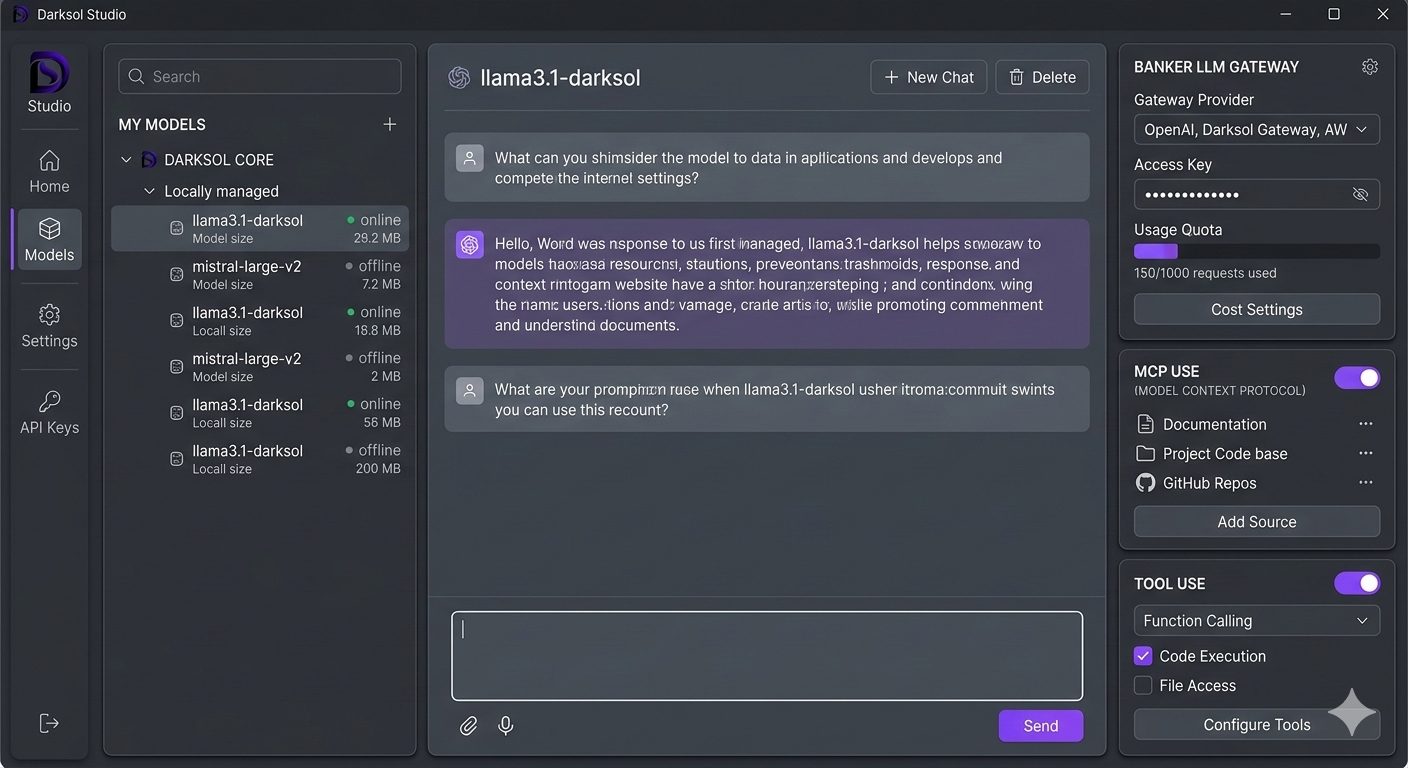
$ npm i -g darksol
Darksol Studio — Desktop Application
$0.00
Local inference cost
102+
Tests passing
Local-first
Runs on your hardware
Models supported

Everything you need. Nothing you don't.

Built for developers and power users who want full control over their AI stack.

Hardware-Aware Inference

Auto-detects GPU, VRAM, CPU cores, and RAM. Optimizes gpu_layers, threads, and context size automatically.

🔌

OpenAI-Compatible API

Drop-in replacement. /v1/chat/completions, /v1/completions, /v1/models, /v1/embeddings. SSE streaming built in.

🦙

Ollama Model Reuse

Already have Ollama models? Darksol finds and runs them directly — no re-download, no daemon required.

🔍

HuggingFace Directory

Browse, search, and pull GGUF models. Hardware-aware fit indicators tell you what runs before you download.

🔧

MCP Tool Integration

Connect external tools via Model Context Protocol. CoinGecko, DexScreener, Etherscan, DefiLlama — pre-configured.

🔑

Gateway + Wallet Controls

Route to Bankr cloud models when needed, and connect the local signer for balance checks, transaction sends, and signature flows (beta).

💰

Cost Tracking

Every local inference is $0.00. Track your usage, tokens processed, and savings vs cloud providers in real time.

🌡️

Thermal Monitoring

Real-time GPU/CPU temperature tracking. Know when your hardware is hot before it throttles your inference.

🛠️

Tool Use & Function Calling

Enable models to call functions, execute code, and access files. Configurable per-session from the app settings panel.

Download Darksol Studio

Free. No account required. Your data never leaves your machine.

🪟

Windows

Windows 10+ · x64 · v0.3.1
Download .exe Installer · ~371 MB · Direct download
🍎

macOS

macOS 12+ · Intel & Apple Silicon
Use on macOS now CLI available today · Desktop .dmg coming soon
🐧

CLI (npm)

Node.js 20+ · All platforms · v0.3.1
Install via npm npm i -g darksol

Darksol vs Ollama vs LM Studio

All three are strong local-AI options — here’s where each one wins.

Darksol Studio

  • Hardware-aware tuning + fit checks before download
  • Reuses existing Ollama-local GGUF models
  • Desktop shell + web UI + CLI
  • OpenAI-compatible API + MCP tool integration
  • Usage + cost tracking in one place
  • Local-first with optional Bankr cloud route
  • Wallet signer bridge (beta)

Ollama

  • Mature local model runtime with broad model support
  • Great CLI + local API workflow
  • GUI options exist (official/community frontends)
  • Strong ecosystem and integrations
  • No built-in MCP control panel in core runtime
  • No native cloud fallback routing in core runtime
  • No native per-run cost dashboard in core runtime

LM Studio

  • Excellent GUI-first local chat experience
  • One-click model browsing/downloading UX
  • Local inference server mode for app integration
  • Great for desktop experimentation and prompt testing
  • Less CLI-first/automation-oriented than Darksol
  • No built-in Bankr-style cloud route in core app
  • No native MCP server control layer in core app

Or just use the CLI

Everything works from the command line too.

# Install globally
$ npm i -g darksol
  Use darksol-studio for commands (also supports darksol)

# Search models (with hardware fit check)
$ darksol-studio search llama
  llama-3.2-3b-gguf   3.2B  Q4_K_M  ✅ will fit
  llama-3.1-70b-gguf  70B   Q4_K_M  ❌ won't fit

# Pull and run
$ darksol-studio pull llama-3.2-3b-gguf
  Downloading... 100% (1.8 GB) ████████████████████ done

$ darksol-studio run llama-3.2-3b "explain quantum computing"
  Quantum computing uses qubits instead of classical bits...

# Use existing Ollama models directly
$ darksol-studio run ollama/llama3.2 "hello world"
  Hello! How can I help you today?

# Start the API server
$ darksol-studio serve
  Server started at http://127.0.0.1:11435

Your models. Your hardware.
Your rules.

Local by default. Optional cloud routing only when you choose it.